
Skip to content
View in the app

A better way to browse. Learn more.

Invision Developers

A full-screen app on your home screen with push notifications, badges and more.

To install this app on iOS and iPadOS
  1. Tap the Share icon in Safari
  2. Scroll the menu and tap Add to Home Screen.
  3. Tap Add in the top-right corner.
To install this app on Android
  1. Tap the 3-dot menu (⋮) in the top-right corner of the browser.
  2. Tap Add to Home screen or Install app.
  3. Confirm by tapping Install.
New Invision Marketplace

Remove Quote Button 1.0.0

(0 reviews)

1 Screenshot

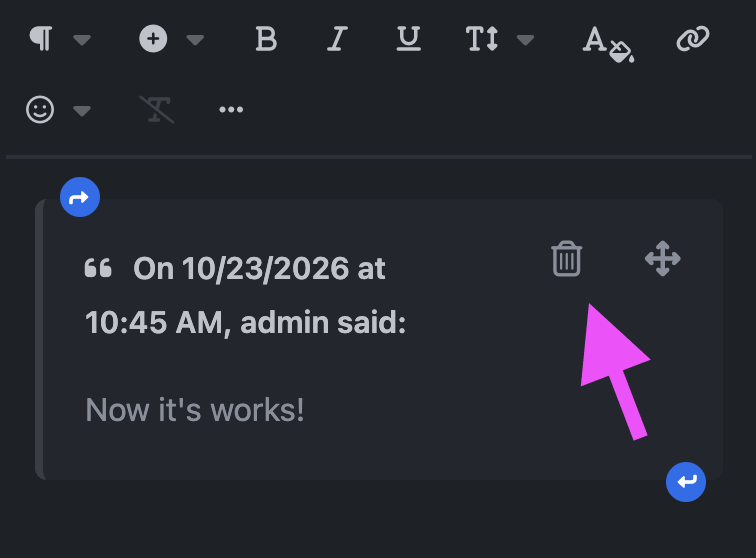
Make quoted replies easier to manage. Remove Quote adds a discreet trash icon to each quote in the editor, allowing members to remove the entire quote with a single click.

The button fits naturally alongside the existing quote controls, with a responsive layout for desktop and mobile screens.

  • One-click removal of a quote and its contents.

  • Undo support to restore an accidentally removed quote.

  • Mobile-friendly controls with comfortable touch targets.

  • Works with inserted quotes and restored drafts.

A small improvement that makes everyday editing more convenient.

User Feedback

You may only provide a review once you have downloaded the file.

There are no reviews to display.

Account

Navigation

Search

Search

Configure browser push notifications

Chrome (Android)
  1. Tap the lock icon next to the address bar.
  2. Tap Permissions → Notifications.
  3. Adjust your preference.
Chrome (Desktop)
  1. Click the padlock icon in the address bar.
  2. Select Site settings.
  3. Find Notifications and adjust your preference.