Skip to content
View in the app

A better way to browse. Learn more.

Invision Developers

A full-screen app on your home screen with push notifications, badges and more.

To install this app on iOS and iPadOS
  1. Tap the Share icon in Safari
  2. Scroll the menu and tap Add to Home Screen.
  3. Tap Add in the top-right corner.
To install this app on Android
  1. Tap the 3-dot menu (⋮) in the top-right corner of the browser.
  2. Tap Add to Home screen or Install app.
  3. Confirm by tapping Install.
New Invision Marketplace

D-Trox

Clients
  • Joined

  • Last visited

Everything posted by D-Trox

  1. I send you a private message. Thank you
  2. However, the right photo is there, but it doesn't apply to the user of the site. I don't know what else to say, there are no error logs or system logs. System Version 4.7.18
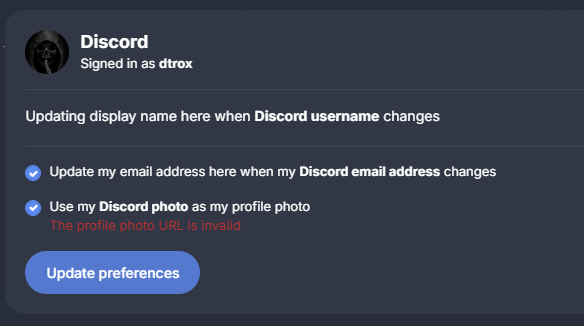
  3. Hello, No I don't have a gif, the avatar on invision is the default one. I just did a fresh install. Or if you mean the avatar on discord, it's just an image, the same one I've had for I don't know how many years.
  4. I got a problem The profile picture not working My users and me, when we go try to update or profile picture with the discord configuration , we got this error The profile photo URL is invalid No system logs reliated to that. Any idea to solve it ? THank you

Account

Navigation

Search

Search

Configure browser push notifications

Chrome (Android)
  1. Tap the lock icon next to the address bar.
  2. Tap Permissions → Notifications.
  3. Adjust your preference.
Chrome (Desktop)
  1. Click the padlock icon in the address bar.
  2. Select Site settings.
  3. Find Notifications and adjust your preference.