Skip to content
View in the app

A better way to browse. Learn more.

Invision Developers

A full-screen app on your home screen with push notifications, badges and more.

To install this app on iOS and iPadOS
  1. Tap the Share icon in Safari
  2. Scroll the menu and tap Add to Home Screen.
  3. Tap Add in the top-right corner.
To install this app on Android
  1. Tap the 3-dot menu (⋮) in the top-right corner of the browser.
  2. Tap Add to Home screen or Install app.
  3. Confirm by tapping Install.
New Invision Marketplace

Square Wheels

Clients
  • Joined

  • Last visited

  1. Thank you
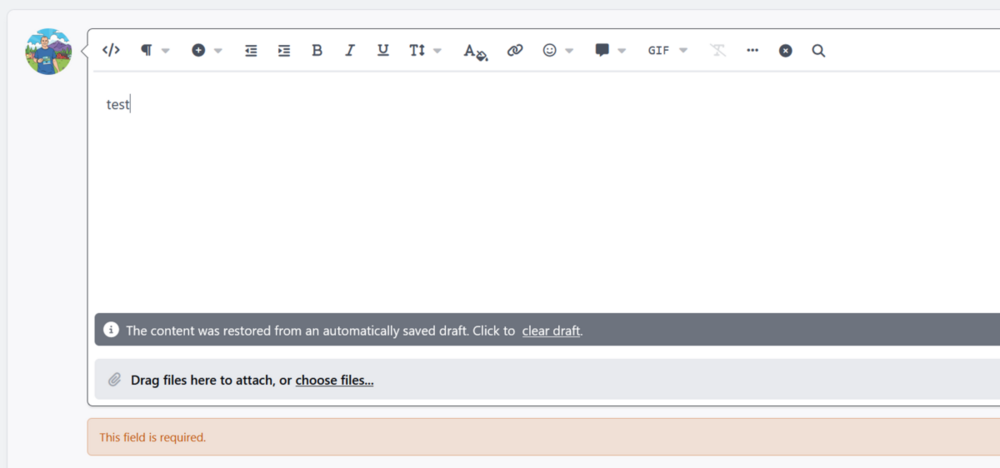
  2. I just tested. I was not editing. The editor was empty, it was a simple new post, and this is what I saw after hitting submit.
  3. Square Wheels started following HTML Editor
  4. I had to inactivate this. Each time I submitted a reply or created a message, it said This Field is Required.
  5. I uninstalled the old version and was able to install this version. Thank you
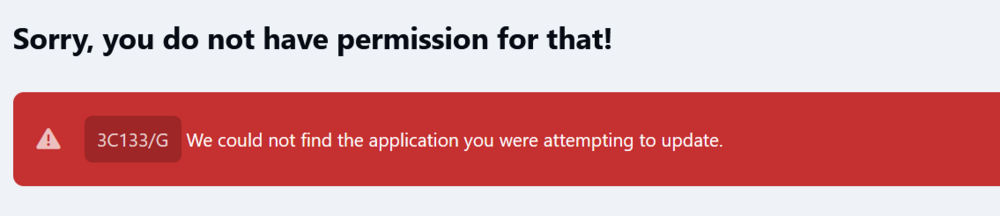
  6. I was on 1.01, I tried to upload the new version and got this:
  7. Thanks! I was hoping to be able to embed an iframe with it, but it looks like it's still blocked. I still have other uses for it, I appreciate this.
  8. Thank you for creating this, it says I cannot download it. Please let me know how to pay for it, or download it. Thank you
Account

Navigation

Search

Search

Configure browser push notifications

Chrome (Android)
  1. Tap the lock icon next to the address bar.
  2. Tap Permissions → Notifications.
  3. Adjust your preference.
Chrome (Desktop)
  1. Click the padlock icon in the address bar.
  2. Select Site settings.
  3. Find Notifications and adjust your preference.