Kirill Gromov
Administrators
-
Joined
-
Last visited
Everything posted by Kirill Gromov
-
Hello. For some people, such an application has no value, but for others it is very necessary. This is a complex application, under the hood it has a complex structure of JS and PHP code. This price includes a lifetime license, including updates and early testing.
-
Hello. We are currently recruiting users who want to purchase the app; I think it will be available to those who have already purchased it in 2-3 weeks.
-
The new version is now available!
-
Hello. I'm considering implementing functionality for editing templates and theme resources. Would you be interested in getting this functionality for IPS5?
-
Hello. What are the problems with the app?
-
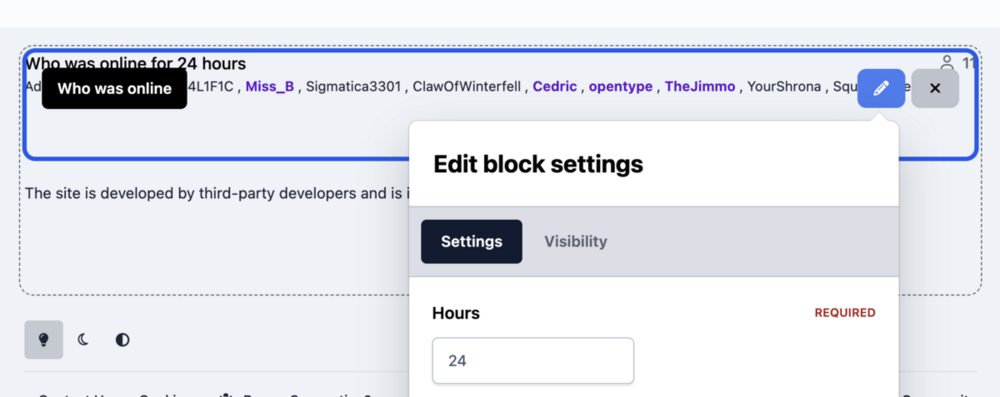
Hello. After placing the widget on the page, click on the pencil icon:
-
Thanks, fixed!
-
HTML Editor HTML Editor - application allows you to change the HTML code of messages and reviews. Created to replace the outdated Edit HTML of posts. Possibilities: Select users/groups (only admins) that can change HTML code. Enable/disable logging. Add/remove icon next to the link. Supports applications: Pages Forums Commerce Events Blogs Personal Messages Gallery Downloads File Information Submitter Kirill Gromov Submitted 08/27/25 Category Free apps for Invision Community 5 View File

-
HTML Editor - application allows you to change the HTML code of messages and reviews. Created to replace the outdated Edit HTML of posts. Possibilities: Select users/groups (only admins) that can change HTML code. Enable/disable logging. Add/remove icon next to the link. Supports applications: Pages Forums Commerce Events Blogs Personal Messages Gallery DownloadsFree
- 1 comment
- 1 review
-
-

- 7
-
-
Hello. Yes, I will do it in the next version!
-
What exactly doesn't work? No specifics..
-
Hello. You should install it as a normal application, then go to Commerce > Payments > Settings > Payment Methods > + Create new
-
Unfortunately, this cannot be done by us.
-
-
-
Hello. Notifications don't necessarily contain a link to an item, they can just be informational messages, so when you open the notification list, you are considered to have read it.
-
Hello. In version 5, this cannot be done without code hooks, unfortunately.
-
Hello, @sman, to accept payments in Revolut, you must use Merchant API. There are no other options.
-
Hello. Are you using the latest version downloaded here?
-
Hello. No, he is not popular!
-
Hello. Have you set up a webhook?
-
HitPay Gateway HitPay unifies online, point of sale, and B2B payments into a single platform. Perfect for businesses ready to scale. HitPay Payment Gateway for Invision Community 5. File Information Submitter Kirill Gromov Submitted 06/07/25 Category Paid apps for Invision Community 5 View File

-
 HitPay unifies online, point of sale, and B2B payments into a single platform. Perfect for businesses ready to scale. HitPay Payment Gateway for Invision Community 5.45.00 USD
 -
Payfast Gateway Receive payments instantly from anywhere around the world in ZAR with Visa and Mastercard issued credit and cheque cards. We process local and international credit card payments with a variety of fraud protection mechanisms in place to minimise the risk of chargebacks. PayFast Payment Gateway for Invision Community 5. File Information Submitter Kirill Gromov Submitted 06/07/25 Category Paid apps for Invision Community 5 View File

-
 Receive payments instantly from anywhere around the world in ZAR with Visa and Mastercard issued credit and cheque cards. We process local and international credit card payments with a variety of fraud protection mechanisms in place to minimise the risk of chargebacks. PayFast Payment Gateway for Invision Community 5.45.00 USD