
Kirill Gromov
Administrators
-
Joined
-
Last visited
Everything posted by Kirill Gromov
-
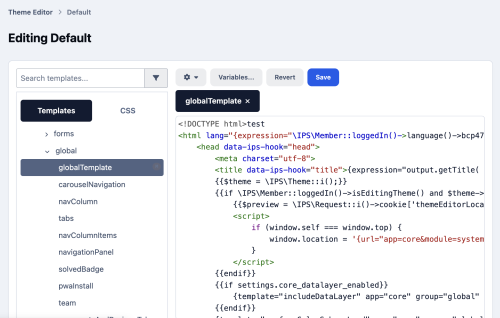
Theme Editor Theme Editor - Classic Theme Editing for Invision Community 5. Theme Editor brings back the theme editing workflow familiar from Invision Community 4.x. Edit HTML templates, CSS, and theme resources directly from your ACP. Customize layouts, refine styles, and adapt your community’s appearance using a code editor with syntax highlighting and tabs. Key Features HTML and CSS editing - modify templates and styles directly in the ACP. Resource replacement - replace images, icons, fonts, and other theme default assets. Independent customization for each theme - changes affect only the selected theme. Template syntax validation - invalid template syntax is rejected before saving, with a clear error message. Revert changes - restore templates and styles, or recover saved original resources. Rebuild templates and CSS - regenerate compiled files from your saved customizations when needed. Designed for administrators who want direct control over their community’s design and miss the familiar theme editing tools from IC4.x. File Information Submitter Kirill Gromov Submitted 10/26/26 Category Paid apps for Invision Community 5 View File
-
Theme Editor - Classic Theme Editing for Invision Community 5. Theme Editor brings back the theme editing workflow familiar from Invision Community 4.x. Edit HTML templates, CSS, and theme resources directly from your ACP. Customize layouts, refine styles, and adapt your community’s appearance using a code editor with syntax highlighting and tabs. Key Features HTML and CSS editing - modify templates and styles directly in the ACP. Resource replacement - replace images, icons, fonts, and other theme default assets. Independent customization for each theme - changes affect only the selected theme. Template syntax validation - invalid template syntax is rejected before saving, with a clear error message. Revert changes - restore templates and styles, or recover saved original resources. Rebuild templates and CSS - regenerate compiled files from your saved customizations when needed. Designed for administrators who want direct control over their community’s design and miss the familiar theme editing tools from IC4.x.66.00 USD
-
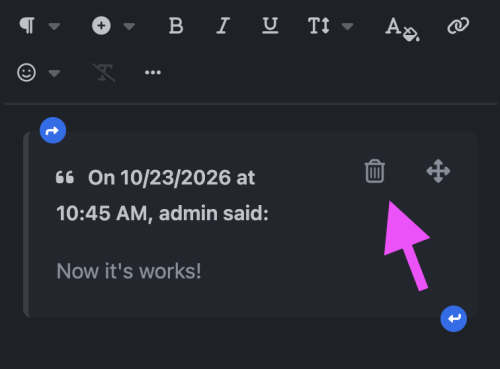
Remove Quote Button Make quoted replies easier to manage. Remove Quote adds a discreet trash icon to each quote in the editor, allowing members to remove the entire quote with a single click. The button fits naturally alongside the existing quote controls, with a responsive layout for desktop and mobile screens. One-click removal of a quote and its contents. Undo support to restore an accidentally removed quote. Mobile-friendly controls with comfortable touch targets. Works with inserted quotes and restored drafts. A small improvement that makes everyday editing more convenient. File Information Submitter Kirill Gromov Submitted 10/24/26 Category Free apps for Invision Community 5 View File
-
Make quoted replies easier to manage. Remove Quote adds a discreet trash icon to each quote in the editor, allowing members to remove the entire quote with a single click. The button fits naturally alongside the existing quote controls, with a responsive layout for desktop and mobile screens. One-click removal of a quote and its contents. Undo support to restore an accidentally removed quote. Mobile-friendly controls with comfortable touch targets. Works with inserted quotes and restored drafts. A small improvement that makes everyday editing more convenient.Free
-
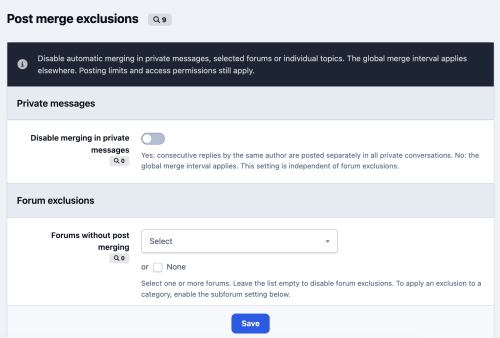
Post Merge Control Choose where consecutive replies should remain separate. Post Merge Control lets you disable automatic merging in selected forums, individual topics and private messages, while keeping your community’s global merge settings everywhere else. Features Forum exclusions: Disable automatic merging in selected forums. Subforum support: Extend exclusions to all nested forums, including subforums created later. Individual topic exclusions: Find topics by title and exclude them independently of their forum. Persistent topic rules: Topic exclusions remain active when a topic moves to another forum. Private message control: Disable merging across private conversations with a simple Yes/No setting. ACP configuration: Manage all exclusions from one settings page. Supports standard and AJAX replies while preserving existing permissions, moderation and flood control. Designed for Invision Community 5.0 and 5.1. Exclusions apply to new replies; previously merged messages are not split. File Information Submitter Kirill Gromov Submitted 10/22/26 Category Free apps for Invision Community 5 View File
-
Choose where consecutive replies should remain separate. Post Merge Control lets you disable automatic merging in selected forums, individual topics and private messages, while keeping your community’s global merge settings everywhere else. Features Forum exclusions: Disable automatic merging in selected forums. Subforum support: Extend exclusions to all nested forums, including subforums created later. Individual topic exclusions: Find topics by title and exclude them independently of their forum. Persistent topic rules: Topic exclusions remain active when a topic moves to another forum. Private message control: Disable merging across private conversations with a simple Yes/No setting. ACP configuration: Manage all exclusions from one settings page. Supports standard and AJAX replies while preserving existing permissions, moderation and flood control. Designed for Invision Community 5.0 and 5.1. Exclusions apply to new replies; previously merged messages are not split.Free
-
Hello. This is a standard feature of licensed forums.
-
Hello. Yes, we haven't heard anything about Mike for a long time. Do you have this app?
-
This app only works on ic 5.1
-
You need to go to settings and enable them.
-
Hover Cards Compatibility: Invision Community 5.1. Hover Cards lets members open profile cards and reaction menus by hovering their mouse over them. It uses Invision Community’s native cards and menus, preserving their familiar appearance, content, and animations. Features Profile cards on hover — preview a member’s profile by hovering over their name or avatar. Adjustable delay — choose how quickly profile cards open. The default is 0.4 seconds; set it to zero for instant opening. Reaction menus on hover — reveal available reactions without an extra click. Selecting a reaction still requires a click. Independent controls — enable profile hover, reaction hover, or both. AJAX support — works with dynamically loaded community content. Touch support — standard tap behavior is preserved on phones and tablets. File Information Submitter Kirill Gromov Submitted 10/17/26 Category Free apps for Invision Community 5 View File

-
Compatibility: Invision Community 5.1. Hover Cards lets members open profile cards and reaction menus by hovering their mouse over them. It uses Invision Community’s native cards and menus, preserving their familiar appearance, content, and animations. Features Profile cards on hover — preview a member’s profile by hovering over their name or avatar. Adjustable delay — choose how quickly profile cards open. The default is 0.4 seconds; set it to zero for instant opening. Reaction menus on hover — reveal available reactions without an extra click. Selecting a reaction still requires a click. Independent controls — enable profile hover, reaction hover, or both. AJAX support — works with dynamically loaded community content. Touch support — standard tap behavior is preserved on phones and tablets.Free
- 1 review
-
-

- 1
-
-
What's your IC version?
-
-
Hi, yes!
-
Mercado Pago Gateway Accept payments through Mercado Pago Checkout Pro directly from your Invision Community 5 Commerce checkout. Customers complete their purchase on Mercado Pago’s hosted payment page, then return to your community while the gateway updates their transaction status. The integration verifies signed webhooks and confirms payment details with Mercado Pago before approving a Commerce transaction. It supports pending and rejected payments, retries after a failed payment attempt, full and partial refunds, and chargeback alerts. Administrators can configure installments, payment-type exclusions, binary mode, and a statement descriptor. Requirements: Invision Community 5 with Commerce, a Mercado Pago account with an Access Token and webhook secret, and a publicly accessible HTTPS site. Recurring payments are not supported. File Information Submitter Kirill Gromov Submitted 09/13/26 Category Paid apps for Invision Community 5 View File

-
Accept payments through Mercado Pago Checkout Pro directly from your Invision Community 5 Commerce checkout. Customers complete their purchase on Mercado Pago’s hosted payment page, then return to your community while the gateway updates their transaction status. The integration verifies signed webhooks and confirms payment details with Mercado Pago before approving a Commerce transaction. It supports pending and rejected payments, retries after a failed payment attempt, full and partial refunds, and chargeback alerts. Administrators can configure installments, payment-type exclusions, binary mode, and a statement descriptor. Requirements: Invision Community 5 with Commerce, a Mercado Pago account with an Access Token and webhook secret, and a publicly accessible HTTPS site. Recurring payments are not supported.50.00 USD
-
Binance Pay Gateway Accept Binance Pay payments in Invision Community 5 Commerce. Customers complete payment on Binance Pay’s hosted checkout page, while the gateway tracks the order and updates their Commerce transaction when payment is confirmed. FeaturesCrypto-denominated or fiat-denominated orders Signed API requests and verified webhook notifications Automatic handling of successful, pending, canceled, and expired payments Full refunds through Commerce, with confirmation from Binance Pay Protection against duplicate payment notifications Requirements: Invision Community 5 with Commerce, a Binance Pay merchant account, API credentials, and a public HTTPS webhook URL. Please note: Recurring payments and partial refunds are not supported. File Information Submitter Kirill Gromov Submitted 09/13/26 Category Paid apps for Invision Community 5 View File

-
Accept Binance Pay payments in Invision Community 5 Commerce. Customers complete payment on Binance Pay’s hosted checkout page, while the gateway tracks the order and updates their Commerce transaction when payment is confirmed. FeaturesCrypto-denominated or fiat-denominated orders Signed API requests and verified webhook notifications Automatic handling of successful, pending, canceled, and expired payments Full refunds through Commerce, with confirmation from Binance Pay Protection against duplicate payment notifications Requirements: Invision Community 5 with Commerce, a Binance Pay merchant account, API credentials, and a public HTTPS webhook URL. Please note: Recurring payments and partial refunds are not supported.60.00 USD
-
GoCardless Gateway Accept one-time bank payments in Invision Community Commerce with a GoCardless-hosted payment flow. Customers authorise their payment on GoCardless and return to your community, while Commerce keeps the transaction pending until GoCardless confirms collection. Configure a gateway for a supported Pay by Bank or Direct Debit scheme and its currency. The integration verifies signed webhooks, handles payment failures and duplicate notifications, and supports full or partial refunds when the payment is eligible through GoCardless. Requirements: Invision Community 5 with Commerce, a GoCardless account, an API access token, and an HTTPS webhook endpoint. Note: Automatic recurring billing agreements are not supported. File Information Submitter Kirill Gromov Submitted 09/13/26 Category Paid apps for Invision Community 5 View File

-
Accept one-time bank payments in Invision Community Commerce with a GoCardless-hosted payment flow. Customers authorise their payment on GoCardless and return to your community, while Commerce keeps the transaction pending until GoCardless confirms collection. Configure a gateway for a supported Pay by Bank or Direct Debit scheme and its currency. The integration verifies signed webhooks, handles payment failures and duplicate notifications, and supports full or partial refunds when the payment is eligible through GoCardless. Requirements: Invision Community 5 with Commerce, a GoCardless account, an API access token, and an HTTPS webhook endpoint. Note: Automatic recurring billing agreements are not supported.50.00 USD
-
dLocal Gateway Accept one-time payments in Invision Community 5 Commerce through dLocal’s hosted checkout. Customers complete payment on dLocal’s secure page, where they can choose from available payment methods or use a method you configure in advance. Key featuresHosted checkout keeps card entry off your community. Sandbox and Production modes with separate credentials. Signed payment notifications and server-side status verification, including delayed payments. Full and partial refunds, including asynchronous refund updates, where supported by dLocal. Chargeback notifications that flag disputed transactions and alert administrators. Requirements: Invision Community 5 with Commerce, a dLocal merchant account, and publicly accessible HTTPS callback URLs. Available payment methods depend on your dLocal account and the customer’s country. Recurring payments and subscriptions are not supported. File Information Submitter Kirill Gromov Submitted 09/13/26 Category Paid apps for Invision Community 5 View File

-
Accept one-time payments in Invision Community 5 Commerce through dLocal’s hosted checkout. Customers complete payment on dLocal’s secure page, where they can choose from available payment methods or use a method you configure in advance. Key featuresHosted checkout keeps card entry off your community. Sandbox and Production modes with separate credentials. Signed payment notifications and server-side status verification, including delayed payments. Full and partial refunds, including asynchronous refund updates, where supported by dLocal. Chargeback notifications that flag disputed transactions and alert administrators. Requirements: Invision Community 5 with Commerce, a dLocal merchant account, and publicly accessible HTTPS callback URLs. Available payment methods depend on your dLocal account and the customer’s country. Recurring payments and subscriptions are not supported.50.00 USD
-
Razorpay Gateway Accept payments through Razorpay directly from Invision Community 5 Commerce. Customers select Razorpay at checkout and complete their payment in a popup on your site. Available payment methods, such as cards, UPI, netbanking and wallets, depend on your Razorpay account. The integration creates a Razorpay order for each transaction, verifies payment signatures and server notifications, and confirms the payment before Commerce fulfills the purchase. It supports full and partial refunds from the Commerce AdminCP, payment retries, and background reconciliation when a notification is delayed. Requirements: Invision Community 5 with Commerce, a Razorpay account, API keys, and a public HTTPS webhook URL. Automatic recurring charges and stored cards are not supported. Refunds made directly in the Razorpay Dashboard require manual reconciliation in Commerce. File Information Submitter Kirill Gromov Submitted 09/13/26 Category Paid apps for Invision Community 5 View File
-
Accept payments through Razorpay directly from Invision Community 5 Commerce. Customers select Razorpay at checkout and complete their payment in a popup on your site. Available payment methods, such as cards, UPI, netbanking and wallets, depend on your Razorpay account. The integration creates a Razorpay order for each transaction, verifies payment signatures and server notifications, and confirms the payment before Commerce fulfills the purchase. It supports full and partial refunds from the Commerce AdminCP, payment retries, and background reconciliation when a notification is delayed. Requirements: Invision Community 5 with Commerce, a Razorpay account, API keys, and a public HTTPS webhook URL. Automatic recurring charges and stored cards are not supported. Refunds made directly in the Razorpay Dashboard require manual reconciliation in Commerce.50.00 USD