
Kirill Gromov
Administrators
-
Joined
-
Last visited
Everything posted by Kirill Gromov
-
View File Ideas The Ideas app for Invision Community allows your users to add ideas to various categories. Any users can vote to promote the ideas they like. Administrators can mark ideas as completed. Features: Creating categories. Custom fields in various categories. Displaying fields in two different places: below the title and below the description. Enable / disable the display of the sidebar with categories when viewing an idea. Indexpage Tabs: newest, popular and completed Ideas. Ajax voting for ideas. The ability for administrators to mark ideas as completed. Commenting on ideas. Submitter Kirill Gromov Submitted 09/02/23 Category Applications
-
View File Telegram Login Handler The application will add the ability to set up authorization on your community using the Telegram bot. To configure you need to create a bot and assign community url address. Submitter Kirill Gromov Submitted 09/02/23 Category Applications
-
View File Profile Reviews Profile Reviews app allows your users to leave rated reviews on other users' profiles. This forms the average rating of the profile from all the reviews in it. Profile reviews can be commented on. Settings Groups that can add reviews. The number of comments per page. Whether or not to show the rating in the profile hovercards. Whether or not to show rating in forum posts. Widgets Top popular profiles. The widget will show the profile with the highest rating based on reviews. Latest reviews. A feed of reviews sorted by date added. Submitter Kirill Gromov Submitted 09/02/23 Category Applications
-
View File Reviews Manager This application cooperates all the reviews of your community in one section of the admin center, where it is much more convenient to moderate and edit them. Apps supported Pages database records. Downloads file. Products from Commerce. Calendars. Gallery Images. Gallery Albums. Reviews are sorted by date, most recent to earliest. In ACP you can Add a new review. Change any review. Change adding date. Change review author. Change the rating of the review. Follow the link to the review. Delete review. Sort reviews by various parameters. Submitter Kirill Gromov Submitted 09/02/23 Category Applications
-
View File Post Donations The application will allow your users to donate for posts indicating an arbitrary amount and reason for donating. You can select groups whose users will be able to donate or accept donations. Specify the donor list limit when viewing a topic. Each donation post displays the total amount of donations by currency. Make the reason field required. You can display the balance in posts and/or in the userBar. Users can control the display of the balance themselves in the settings of their account. The author of the post will receive a notification about the new donation. Commerce integration You can specify the amount of the commission that will be charged. You can donate in any currency and any payment gateways that exist and are configured in the Commerce application. Widgets Currently, you can place two widgets on your pages: Top donors. The widget will show users who donated the most for posts for a certain period of time (week, month, year, or all time). Latest donations. The widget will show the donor, the author of the post, the date and amount of the donation. For the application to work, you must have a Commerce installed application. Submitter Kirill Gromov Submitted 09/02/23 Category Applications
-
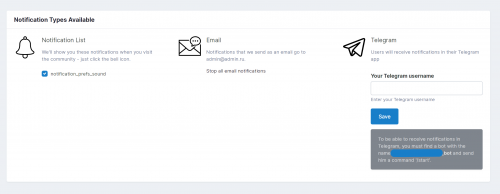
Telegram Notifications Telegram Notifications application is intended for users to receive instant notifications in Telegram on all Invision Community events: Achievements, Moderation, Mentions & My Content, Followed Content, Messenger, Profile, Newsletter, Event Reminders, File Updates. You can configure which groups will be able to set up notifications in Telegram for themselves, as well as which types of notifications will be enabled / disabled by default. Информация Submitter Kirill Gromov Submitted 02.09.2023 Category Applications Просмотр файла
-
View File Profile Statistics The application collects basic statistics of user activity and displays it in the tables and charts in a separate tab in the profile. You can control which user groups will be able to view the tab with such statistics. Thanks for alexxis for sponsoring this app. Capabilities Block with basic statistics - the number of topics, posts, polls, etc. Block with information displaying the most active time periods - hour, day of the week, month, year. User activity chart by hours, days of the week, months and years. User activity on specific forums, percentage of activity. A section in each forum that collects all posts by a particular user in chronological order. Submitter Kirill Gromov Submitted 09/02/23 Category Applications
-
View File Share to Telegram The Share to Telegram app adds a button to the social media services, allowing you to distribute any content from your community to any user on Telegram. Submitter Kirill Gromov Submitted 09/02/23 Category Applications
-
View File Pages feeds offset configuration The plugin adds a new setting to the configuration of the record feeds from the database, allowing you to specify the offset when fetching data. Submitter Kirill Gromov Submitted 09/01/23 Category Applications
-
View File Task Manager Task Manager for Invision Community. Allows users with access to create boards, columns, and task cards. You can change the status of tasks, as well as assign them to specific users, who will receive a notification after assignment and more. Boards In the ACP, you can create an unlimited number of task boards. Each board can have its own description. The board card contains information on how many columns, tasks and editors it contains. The board has an activity section where all user actions are recorded. Columns Columns of tasks exist in a specific board and contain cards (tasks). Each column has its own name and highlight color. Columns can be swapped on the fly using Drag-and-drop technology. Columns can only be created by board editors, and you can add an unlimited number of them. Task cards The card has its own name, description, background color and cover. Cards can be swapped on the fly using Drag-and-drop technology, as well as transferred between columns. Cards (tasks) can be assigned to other users. After assigning a task, the user will receive a notification. He will also be able to change the status of the card. Submitter Kirill Gromov Submitted 09/01/23 Category Applications
-
View File Photo in registration form The plugin adds a photo upload form to the new user registration form. Plugin settings: Maximum photo size; Max photo width / height; Submitter Kirill Gromov Submitted 09/01/23 Category Applications
-
View File PM author info The application adds the ability to set an informational message when certain users or groups are selected as private message recipients. The message will be loaded automatically. Submitter Kirill Gromov Submitted 09/01/23 Category Applications
-
View File QIWI Wallet Payment Gateway QIWI Wallet Payment Gateway for Commerce in Invision Community. Allows you to set up payment acceptance using the QIWI wallet. Submitter Kirill Gromov Submitted 09/03/23 Category Payment Gateways
-
View File YooMoney Payment Gateway Your users will be able to reward the content of other users by paying an arbitrary amount to the YooMoney user's account. In addition, the application adds a payment gateway for paying for products and subscriptions in Commerce. Post Rewards Integration with YooMoney allows you to set up a simple and fast payment for posts, thus users can thank each other by paying for useful posts. Below the buttons for managing the post, a list with users who thanked for the post, their amount and the reason for gratitude will be displayed. Rewards Leaders The application adds a separate page with popular users who thanked the posts of other users the most, whose posts received the most thanks and popular posts that received the most thanks. Operations history In the YooMoney settings, the user can view the history of transactions in the wallet, as well as information about the status and type of his account. You can activate the setting for displaying the wallet number and its balance in the information about the author in posts. Notifications Every time a post receives a reward, its author is notified about it. Widgets You can place on any page of your site a block with the top users who thanked the most for the posts. Settings You can control which groups can reward, whose posts can receive a reward, oblige to fill in the reason for the reward, and much more. Submitter Kirill Gromov Submitted 09/03/23 Category Payment Gateways
-
View File Enot.io Payment Gateway Enot.io - accept payments online, available for individuals and legal entities. Submitter Kirill Gromov Submitted 09/02/23 Category Payment Gateways
-
View File BitPay Payment Gateway BitPay - accept Bitcoin and other cryptocurrencies, gain new customers, and avoid the cost of high fees and chargebacks. From setup to settlement, BitPay makes accepting these payments easy. How it works Invoice. BitPay displays the invoice for your customer. Payment. Your customer pays the BitPay invoice at a locked-in exchange rate. Conversion. BitPay converts the customer’s payment into your local currency. Transfer. BitPay initiates a bank settlement to you the next business day. Submitter Kirill Gromov Submitted 09/02/23 Category Payment Gateways
-
View File MultiSafepay Payment Gateway MultiSafepay - Easily accept all popular online payments methods like iDEAL, AMEX, VISA, Apple Pay. Submitter Kirill Gromov Submitted 09/02/23 Category Payment Gateways
-
View File YooKassa Payment Gateway YooKassa Payment Gateway for Invision Community! YooKassa works only with companies, for individual use - YooMoney. Payment methods in YooKassa: Bank cards. American express. Electronic money. Cash. Internet banking. Phone balance. B2B payments. Submitter Kirill Gromov Submitted 09/02/23 Category Payment Gateways
-
View File PayOnline Payment Gateway By connecting to PayOnline, you can accept payments on your site using popular means of payment. Submitter Kirill Gromov Submitted 09/02/23 Category Payment Gateways
-
View File CoinGate Payment Gateway CoinGate Payment Gateway for Invision Community. Buy, Sell & Accept Cryptocurrency. Buy Bitcoin, Litecoin, Ethereum and other cryptocurrencies in Europe and Worldwide. Accepting Bitcoin Payments on Any Stores. Submitter Kirill Gromov Submitted 09/02/23 Category Payment Gateways
-
View File Crypto.com Payment Gateway Start accepting crypto payments today - Crypto.com Payment Gateway for Invision Community. Tap into the global cryptocurrency economy and start accepting Bitcoin and other popular cryptocurrencies on your community. Submitter Kirill Gromov Submitted 09/02/23 Category Payment Gateways
-
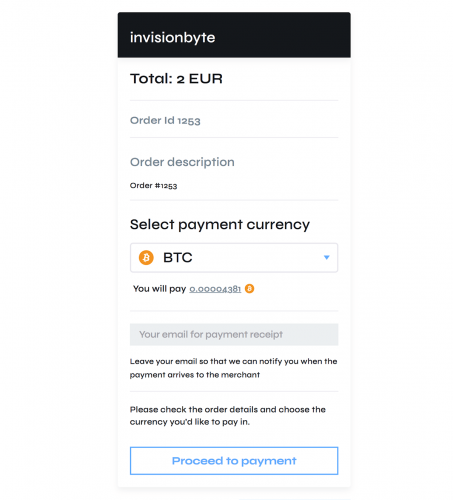
NOWPayments Payment Gateway NOWPayments is a non-custodial cryptocurrency payment processing platform. Accept payments in a wide range of cryptos and get them instantly converted into a coin of your choice and sent to your wallet. Keeping it simple – no excess. File Information Submitter Kirill Gromov Submitted 09/02/23 Category Payment Gateways View File
-
View File Blockchain Integration Bitcoin payments for Invision Community. Integration with the Blockchain.com service allows you to integrate Bitcoin payments into the Commerce application. When choosing a payment method through the Blockchain, the user will be automatically issued a BTC address and the amount in bitcoins that he must pay to this address. The integration also includes 4 widgets: Bitcoin statistics A summary of Bitcoin network statistics for the previous 24-hour period. The widget shows up-to-date data, for example, the cost of bitcoin, the size of the commission, how much was mined, etc. Bitcoin converter You can select the currency and convert the x value in the specified currency to BTC. In the widget settings, you can select specific currencies that will be available for conversion. Current value of 1 BTC The widget will display the cost of 1 Bitcoin in the currencies selected in its settings. Address balance You can check the balance of any BTC address, just paste it into the field and click the Check button. Submitter Kirill Gromov Submitted 09/02/23 Category Payment Gateways
-
View File RBK.money Payment Gateway RBK.money is an international platform for all types of payments. Payments in 60 countries. One contract for all payments. Connection in 48 hours. Fraud Payment Protection. Withdrawal in the next day. Submitter Kirill Gromov Submitted 09/02/23 Category Payment Gateways
-
View File Binance Pay Gateway Binance Pay is contactless and secure international cryptocurrency payments on Binance. With this application, your users will be able to pay for products and subscriptions with cryptocurrency through Binance application or Binance site. Submitter Kirill Gromov Submitted 09/01/23 Category Payment Gateways

