
Kirill Gromov
Administrators
-
Joined
-
Last visited
Everything posted by Kirill Gromov
-
This is an incorrect URL, you did not encode it as indicated in the instruction!
-
Hello. Can you check this url? https://api.telegram.org/bot{YOURAPIKEY}/getWebhookInfo
-
Webhook url must be url encoded, example":
-
Hello. Full instruction: Creating a bot in Telegram In the Telegram client, find the BotFather bot and send it the "/start" command, after which the bot will send you all possible commands to communicate with it. To create a new bot, we need the command "/newbot", then follow the further instructions and specify the name. After the bot is created, you will be shown the API in the Use this token to access the HTTP API line: It must be specified in the settings in the Admin center> Community> Telegram> Settings API token of your Telegram bot. In the Bot name field, enter the name of the bot. Installing the webhook For the bot to send notifications, you need to set up a web hook. To do this, compose a URL and navigate to it in your browser: https://api.telegram.org/bot{BOT_API}/setWebhook?url=https://{SITE_URL}/?app=telegram&module=telegram&controller=telegram After that, the screen should display approximately the following information: {"ok": true, "result": true, "description": "Webhook was set"} Configuring notifications Notification options are enabled in the app, but not activated for all users at once. Therefore, you can make each notification event not as a suggested option, but enabled by default for all users. Each user will receive a notification on Telegram if two conditions are met: Enabled parameter in notification settings (/notifications/options/). The user's nickname is indicated in "Your nickname in Telegram" on the same page.
-

From the album: test
-
test
-

From the album: test
-

From the album: test
-
@sman, Thanks for bringing this to our attention!
-
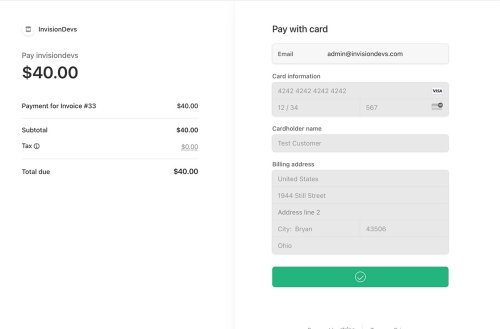
Stripe Checkout Gateway Stripe Checkout is a prebuilt, hosted payment page optimized for conversion. Whether you offer one-time purchases, use Checkout to easily and securely accept payments online. Differences from Stripe by IPS The entire payment process takes place on the Stripe website, on a special stylized page that you can brand with the style of your community. The client is more confident to enter his card details on the Stripe website. Based on the billing address, the tax amount is automatically calculated. You can change the color scheme, font, rounding of the payment form. Features Stripe Tax to automate tax calculation and collection or define applicable tax rates. Toggle Tax behavior - disabled/inclusive/exclusive. Dispute processing. Refunds/partial refunds supporting. Ability to ban a member after a refund. Ability to force Stripe to collect a billing address. Ability to select a specific payment method, such as Card, Klarna, Ali Pay, etc. Payment methods Card payments Alipay Affirm Afterpay / Clearpay Apple Pay Bacs Direct Debit Bancontact Boleto EPS FPX Giropay Google Pay GrabPay iDEAL Klarna Link OXXO Pre-authorized debits Przelewy24 SEPA Direct Debit Sofort WeChatPay Kakao Pay South Korean cards Naver Pay Samsung Pay PAYCO Alma What’s new in 2.0.0 Latest API version supported: 2024-10-28.acacia Added new pay methods: South Korean cards Naver Pay Kakao Pay Samsung Pay PAYCO Code optimization Detailed transaction information is now displayed in the ACP Support Invision Community 5 and higher Информация Submitter Kirill Gromov Submitted 06.11.2024 Category Paid apps for Invision Community 5 Просмотр файла
-
Stripe Checkout is a prebuilt, hosted payment page optimized for conversion. Whether you offer one-time purchases, use Checkout to easily and securely accept payments online. Differences from Stripe by IPS The entire payment process takes place on the Stripe website, on a special stylized page that you can brand with the style of your community. The client is more confident to enter his card details on the Stripe website. Based on the billing address, the tax amount is automatically calculated. You can change the color scheme, font, rounding of the payment form. Features Stripe Tax to automate tax calculation and collection or define applicable tax rates. Toggle Tax behavior - disabled/inclusive/exclusive. Dispute processing. Refunds/partial refunds supporting. Ability to ban a member after a refund. Ability to force Stripe to collect a billing address. Ability to select a specific payment method, such as Card, Klarna, Ali Pay, etc. Payment methods Card payments Alipay Affirm Afterpay / Clearpay Apple Pay Bacs Direct Debit Bancontact Boleto EPS FPX Giropay Google Pay GrabPay iDEAL Klarna Link OXXO Pre-authorized debits Przelewy24 SEPA Direct Debit Sofort WeChatPay Kakao Pay South Korean cards Naver Pay Samsung Pay PAYCO Alma What’s new in 2.0.0 Latest API version supported: 2024-10-28.acacia Added new pay methods: South Korean cards Naver Pay Kakao Pay Samsung Pay PAYCO Code optimization Detailed transaction information is now displayed in the ACP Support Invision Community 5 and higher60.00 USD
-
Hello, Andre! You can now!
-
-
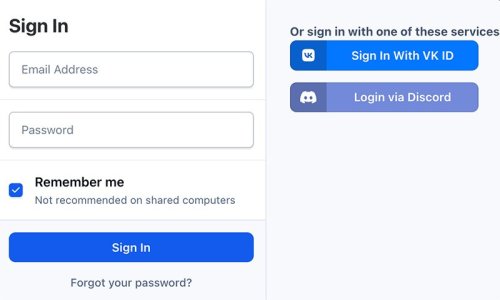
Discord Login Discord Login - an application that allows your members to register using their own discord account. It can: Login via Discord account; Use Discord.com photo as profile photo of registering member. File Information Submitter Kirill Gromov Submitted 11/01/24 Category Free apps for Invision Community 5 View File
-
Discord Login - an application that allows your members to register using their own discord account. It can: Login via Discord account; Use Discord.com photo as profile photo of registering member.Free
-
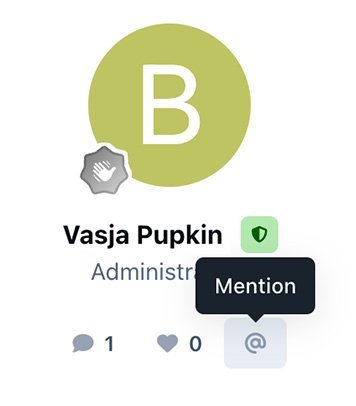
Member mention Member mention - application allows you to add a button to mention a user in his message. App settings To set up the application, go to Theme editor > Content > Body > Mention. Here you can choose four button locations: Author pane (next to the name). Post controls. Post user stats Post user info File Information Submitter Kirill Gromov Submitted 10/31/24 Category Free apps for Invision Community 5 View File
-
Member mention - application allows you to add a button to mention a user in his message. App settings To set up the application, go to Theme editor > Content > Body > Mention. Here you can choose four button locations: Author pane (next to the name). Post controls. Post user stats Post user infoFree
-
Hello. Thanks, But we do not plan to make such a app!
-
To get API keys we need to have a verified account with a Brazilian phone number. We do not have this option.
-
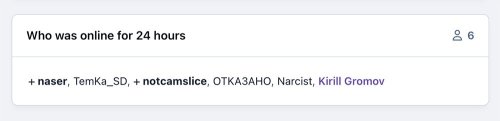
Who was online Who was online - widget that adds statistics of users who have been online for the last X hours. File Information Submitter Kirill Gromov Submitted 10/28/24 Category Free apps for Invision Community 5 View File
-
Who was online - widget that adds statistics of users who have been online for the last X hours.Free
-
@sman hello. Can you send me the acp access?
-
 VK ID Login Handler with full functionality of email, name and photo sync. Step #1 After installing the VK ID Login Handler, you need to create a new app: https://id.vk.com/about/business/go. After which you will receive an App ID and Secure key for the necessary settings. Step #2 After creating the application, go to the menu Access and enable Email from Basic access area!40.00 USD
 -
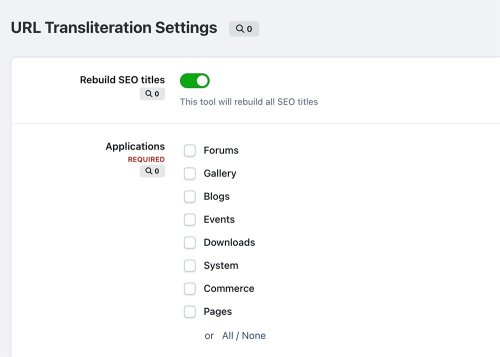 Transliteration - application, which allows you to transliterate non-latin URLs into Latin to improve your community's SEO optimization. You can also add any other symbols. Supported symbols: Latin Greek Turkish Russian Ukrainian Czech Polish LatvianFree
 -
 YooMoney Quickpay - application allows you to accept payments on the Invision Community through YooMoney wallets or bank cards.50.00 USD